This article contains affiliate links. If you buy through them, we may earn a commission at no extra cost to you. We only recommend options that fit the trip described.
Last fact-checked: July 25, 2026. eSIM plans, prices, phone features, and hotspot rules can change. Use this guide to choose the right type of plan, then confirm the current details before payment.
Need mobile data right after landing?
Before buying any Japan eSIM, confirm that your phone supports eSIM, is carrier-unlocked, and can be installed before departure. If those checks are clear, start by comparing Saily’s current Japan plans.
- Best for: first-time visitors who want a simple English-language app
- Check before payment: plan duration, data amount, hotspot rules, and activation timing
- Do not buy until: your exact phone model and carrier-lock status are confirmed

Quick answer: There is no single best eSIM for every Japan trip.
- Start with Saily if you want a simple, budget-first option with fixed-data and unlimited choices in one English-language app.
- Compare Airalo if you want a broad menu of plan sizes and durations.
- Check Holafly if unlimited mobile data matters more than the price, but verify its current hotspot allowance before buying.
For most first-time visitors, the bigger risk is not choosing the “wrong” brand. It is buying before checking that the phone supports eSIM and is carrier-unlocked.
- Best Japan eSIM at a Glance
- Why Mobile Data Matters on a First Japan Trip
- Check Your Phone Before You Buy
- Saily vs Airalo vs Holafly
- eSIM or Pocket WiFi?
- How Much Data Should You Choose?
- How to Install and Activate a Saily eSIM
- If Your eSIM Does Not Connect
- Kansai Situations Where Data Helps
- Frequently Asked Questions
- Final Recommendation
Best Japan eSIM at a Glance
| Provider | Best fit | Plan style to compare | Important check |
|---|---|---|---|
| Saily | First-time visitors who want a simple starting point | Fixed-data and unlimited Japan plans | Install before the trip; its optional phone-number feature is not a Japanese local number |
| Airalo | Travelers who want more plan-size and duration choices | Fixed-data and unlimited options may be available | Check the exact plan’s validity, top-up, and hotspot terms |
| Holafly | Heavy phone-data users who do not want to count GB | Unlimited-focused Japan plans | Its Japan page currently states a daily hotspot allowance; confirm it before purchase |
I would not choose from price screenshots or an old comparison table. These products change too often. Compare the current checkout total, validity period, hotspot rule, and activation instructions on the day you buy.
Want the simplest place to start?
Compare Saily’s current Japan plans, but complete the compatibility checklist below before paying.
Check current Saily Japan plans →
Why Mobile Data Matters on a First Japan Trip
You can travel in Japan without being online every minute, but the moments when data matters arrive quickly:
- checking the correct airport train and platform after landing
- rerouting when a train is delayed or you board the wrong service
- translating a menu, ticket machine, or hotel message
- showing a booking QR code
- using the Universal Studios Japan app inside the park
- contacting your hotel when arrival plans change
Living in Nara, I would plan around the transfers between Osaka, Kyoto, and Nara rather than chase a theoretical top download speed. The useful plan is the one that activates reliably, keeps your home line from using expensive roaming data, and gives you enough data for maps and bookings.
Airport and hotel WiFi can be useful backups. They are not a complete arrival plan because you may need directions between those WiFi points.
Check Your Phone Before You Buy
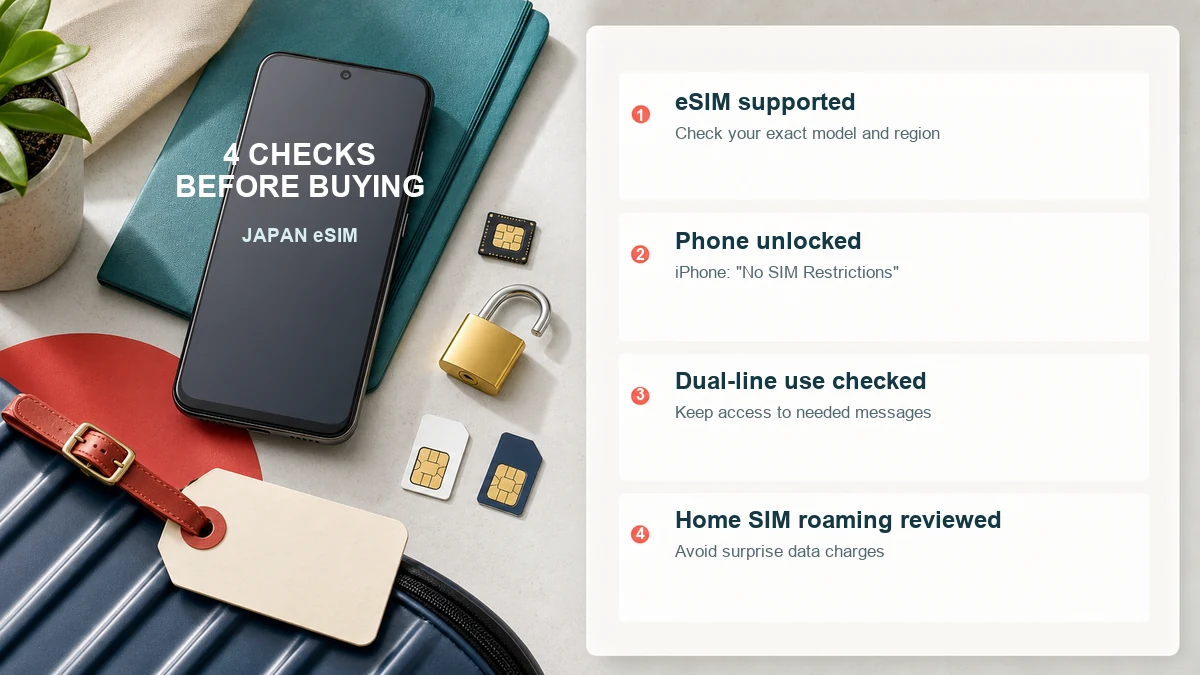
Complete all four checks:
- Confirm eSIM support for your exact model and country version. Model names alone are not enough because regional variants can differ. Look for “Add eSIM” in your phone settings and check the manufacturer’s support page.
- Confirm the phone is carrier-unlocked. On iPhone, Apple says you can check Settings > General > About > Carrier Lock. “No SIM Restrictions” means the iPhone is unlocked.
- Confirm you can install a second line. If you want to keep your home SIM active for incoming messages, check that your device supports the combination you plan to use.
- Check your home carrier’s roaming settings and charges. Keep mobile data and data roaming off for the home line unless you intentionally want to use it.
Do these checks before paying. A travel eSIM cannot bypass a carrier lock or add eSIM support to an incompatible phone.
Saily vs Airalo vs Holafly
Saily: Best Simple Starting Point
Saily’s Japan plan page currently shows both fixed-data and unlimited choices. Its app handles purchase, installation, and plan management in English, and Saily says an installed plan activates automatically when it connects to a supported network at the destination.
Why it fits many first-time visitors:
- one app for installation and plan management
- fixed-data and unlimited choices
- hotspot support is advertised
- the current plan page is more reliable than a fixed price table that will go stale
What to check:
- install the eSIM while you still have reliable internet
- activate the purchased plan within Saily’s stated activation window
- the optional Saily phone number is US-based, not a Japanese local number
- confirm current plan, refund, hotspot, and phone-feature terms before payment
Airalo: Best for Comparing More Plan Sizes
Airalo is worth comparing when you want to choose among different data amounts and validity periods. Do not assume the plan name, network, price, or top-up rule from an older review. Open the current Japan listing and inspect the exact plan before checkout.
Airalo can suit you if:
- you already use the Airalo app
- you want to compare several data amounts
- you prefer a fixed-data plan and are comfortable monitoring usage
Hotspot availability can depend on the specific eSIM, network, and device, so verify it if you plan to tether a laptop.
Holafly: Best for Heavy Phone Data
Holafly positions its Japan product around unlimited data. That can be easier for travelers who stream, upload video, or use navigation all day.
The tradeoff is that “unlimited phone data” does not automatically mean unlimited tethering. At the July 25, 2026 fact-check, Holafly’s Japan page stated a 1 GB-per-day hotspot allowance. Recheck this if laptop work or group sharing is important.
Holafly can suit you if:
- you value not tracking mobile-data usage
- most use will stay on one phone
- you have checked the current fair-use and hotspot terms
eSIM or Pocket WiFi?
| Choose an eSIM when… | Choose pocket WiFi when… |
|---|---|
| each traveler wants independent internet | several people will stay together all day |
| you do not want another device to charge and return | you need to connect several devices |
| your phone is unlocked and supports eSIM | one or more phones do not support eSIM |
| you want data working without an airport pickup | the group accepts sharing one battery-powered device |
For a couple that may split up, two eSIMs are usually more practical than one shared router. For a family that stays together and connects tablets, pocket WiFi may be easier. Compare the total group cost and return conditions, not only the headline daily rate.
How Much Data Should You Choose?
Use behavior, not trip length alone:
- Light use: maps, train searches, translation, messaging, and occasional web browsing
- Regular use: all of the above plus social media, frequent photo sharing, and booking apps
- Heavy use: video streaming, cloud photo backup on mobile data, video calls, or laptop tethering
Before buying a larger plan, set app stores, cloud photo backup, podcast downloads, and video downloads to WiFi only. Download offline maps and entertainment before the flight. That often matters more than estimating an exact number of GB from someone else’s trip.
How to Install and Activate a Saily eSIM
Provider instructions differ. For Saily, the current official flow is:
- Buy the Japan plan and install the eSIM while connected to reliable internet.
- Use the Saily app’s installation flow or its QR-code option.
- Label the new line “Japan” or “Saily” so you can identify it later.
- Before departure, keep mobile data roaming off for your home line.
- On arrival, enable the Saily eSIM, select it for mobile data, and enable data roaming for that eSIM.
- Open a website or Maps to confirm that data works before leaving the airport.
Saily says its plan starts automatically when the installed eSIM connects to a supported destination network. Its support documentation also says to install and activate the plan within 30 days of purchase. Recheck the instructions shown for your order because activation rules can change.
If Your eSIM Does Not Connect
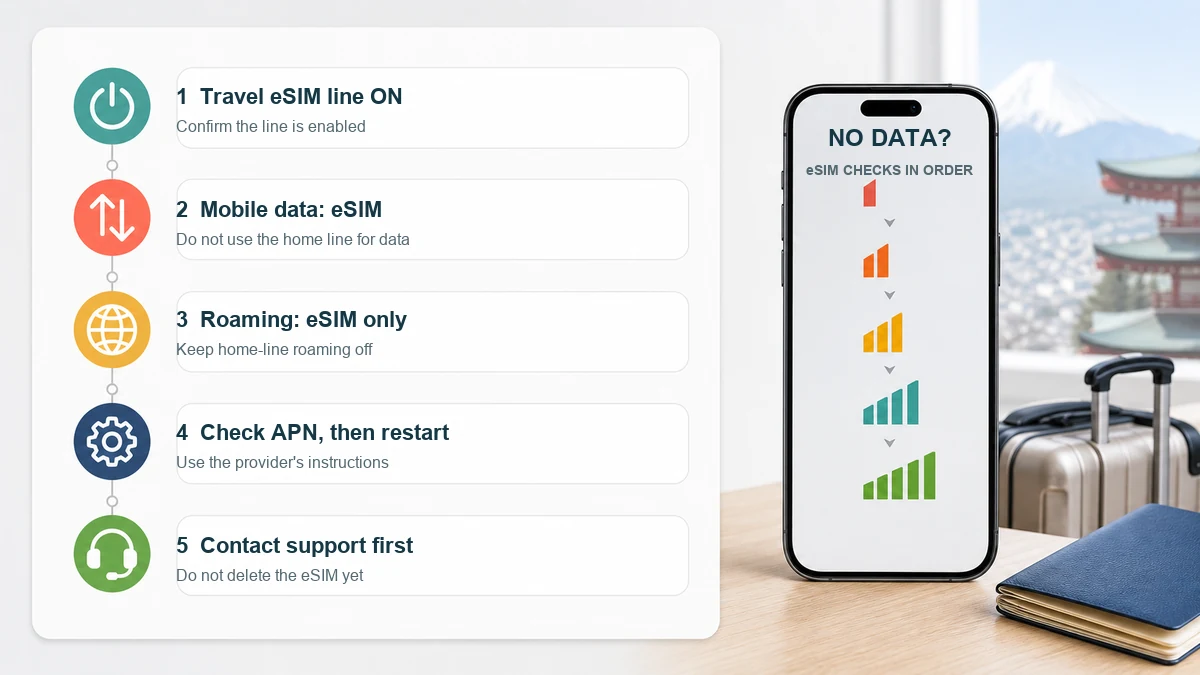
Work through these in order:
- Confirm that the travel eSIM line is switched on.
- Confirm that mobile data is assigned to the travel eSIM, not your home line.
- Enable data roaming for the travel eSIM and keep it off for the home line.
- Disable automatic mobile-data switching if it could move data back to the home SIM.
- Check the APN against the provider’s current instructions.
- On Android, Saily says leaving its app open for up to five minutes may help activation finish.
- Toggle airplane mode once or restart the phone.
- Contact provider support before deleting the eSIM. Deleting it can make reinstallation harder.
Save the provider’s setup page and your order details offline before departure.
Kansai Situations Where Data Helps
- Kansai Airport arrival: compare your hotel area with the train or bus you actually booked. See the Kansai Airport transfer guide.
- Universal Studios Japan: the official app requires internet access for in-park functions. Read the USJ ticket and app guide before your park day.
- Nara day trip: live route checks help when choosing between Osaka, Kyoto, and Nara connections. Use the Nara day trip guide.
Frequently Asked Questions
Can a Japan travel eSIM receive calls and SMS?
Many travel eSIM plans are data-focused. Saily currently advertises an optional US-based phone number and minutes feature, but that is not a Japanese local number. Check whether your bank, airline, restaurant, or two-factor authentication service accepts it. Keep access to your home SIM if receiving its SMS is essential, and check your carrier’s roaming charges.
Can I buy an eSIM after arriving in Japan?
Usually yes, but purchase and installation require internet access. Installing before departure removes that dependency and gives you time to resolve compatibility problems.
Will one eSIM work in Osaka, Kyoto, Nara, and Tokyo?
A Japan plan is designed for use within Japan, but real performance varies by the provider’s partner network, your device, congestion, buildings, tunnels, and rural terrain. Do not treat a city-level coverage promise as a guarantee for every station or mountain route.
Do I need mobile data for Universal Studios Japan?
Plan to have it. The official USJ app is used for important in-park functions, and USJ states that internet access is required. Save tickets to your phone before arrival as a backup.
Should I keep my home SIM turned on?
You may keep it active to receive messages if your phone supports dual-line use, but assign mobile data to the travel eSIM and disable data roaming for the home line. Check whether incoming calls or SMS create charges with your carrier.
Final Recommendation
- Simple first comparison: Saily
- More plan-size choices: Airalo
- Heavy phone-data use: Holafly
- Several people and devices staying together: compare pocket WiFi
Whichever option you choose, verify compatibility first, install it on reliable WiFi, and save the setup instructions offline.
Ready to compare the current Saily options?
Choose a plan based on your real usage and current trip length rather than an old price screenshot.
Compare current Saily Japan plans →
An eSIM is only one part of arrival planning. Continue with What to Book Before Your First Japan Trip for hotels, airport transport, and activities.
Planning your first Japan trip? Use the free Japan Starter Guide to organize the decisions that matter before you fly.